The Best Personal Finance Software for Linux in 2026
Desktop and plain-text options for budgeting, bookkeeping and investments on Linux, with the latest versions and how to install each one.
Linux has some of the longest-running personal finance software around, and most of it is free and open source. Most of the “best Linux finance app” lists you'll find are years old, though, so this one starts from the current versions in October 2026.
I build Covely, one of the apps below, which isn't open source. I've listed it alongside the open-source options and said where each one fits.
Quick comparison
| App | Latest version | Install | Style | Investments |
|---|---|---|---|---|
| GnuCash | 5.17 | Distro packages, Flathub | Double-entry bookkeeping | Yes |
| KMyMoney | 5.2.2 (Feb 2026) | Distro packages, Flathub, AppImage | Ledger with budgets | Yes |
| Skrooge | 26.8.0 (Aug 2026) | Distro packages, Flathub | Ledger with powerful reports | Yes |
| HomeBank | 5.10.3 (Sep 2026) | Distro packages, Ubuntu PPA | Simple expense tracking | No |
| Actual Budget | Current release | Flathub, AppImage | Envelope budgeting | No |
| Covely | Current release | Flatpak, .deb | Budgets, net worth and reports | Yes, plus property |
| hledger / Beancount | Current releases | Distro packages, pip | Plain-text accounting | Yes |
1. GnuCash
The best-known open-source finance app on any platform. GnuCash uses proper double-entry accounting, handles investments and multiple currencies, and even does small-business invoicing. On Linux, install it from your distribution or from Flathub.
- Best for: accurate books for people comfortable with accounting terms. Expect a learning curve.
2. KMyMoney
KDE's personal finance manager is double-entry underneath but friendlier than GnuCash, with budgets, scheduled transactions, loans and investments. Version 5.2.2 came out in February 2026 and is available from most distributions, Flathub and as an AppImage. Online banking through AqBanking works on Linux.
- Best for: KDE and Linux desktop users who want a complete ledger.
3. Skrooge
Also from the KDE community, Skrooge focuses on fast data entry and flexible reports, with features such as unlimited undo and powerful filtering. It's actively maintained: version 26.8.0 shipped in August 2026, and it's on Flathub.
- Best for: people who like slicing their data in lots of ways.
4. HomeBank
Small, fast and easy to learn. HomeBank imports bank files well and has useful charts and budgets, but no investment tracking. The latest version is 5.10.3; on Ubuntu the project recommends its official PPA.
- Best for: straightforward household budgets.
5. Actual Budget
A free, open-source envelope budgeting app in the style of YNAB, with a Linux desktop app on Flathub and as an AppImage. Your budget lives on your device; syncing and bank sync need an Actual server, which is easy to run on a home server if you already self-host.
- Best for: zero-based budgeting, especially for self-hosters.
6. Covely
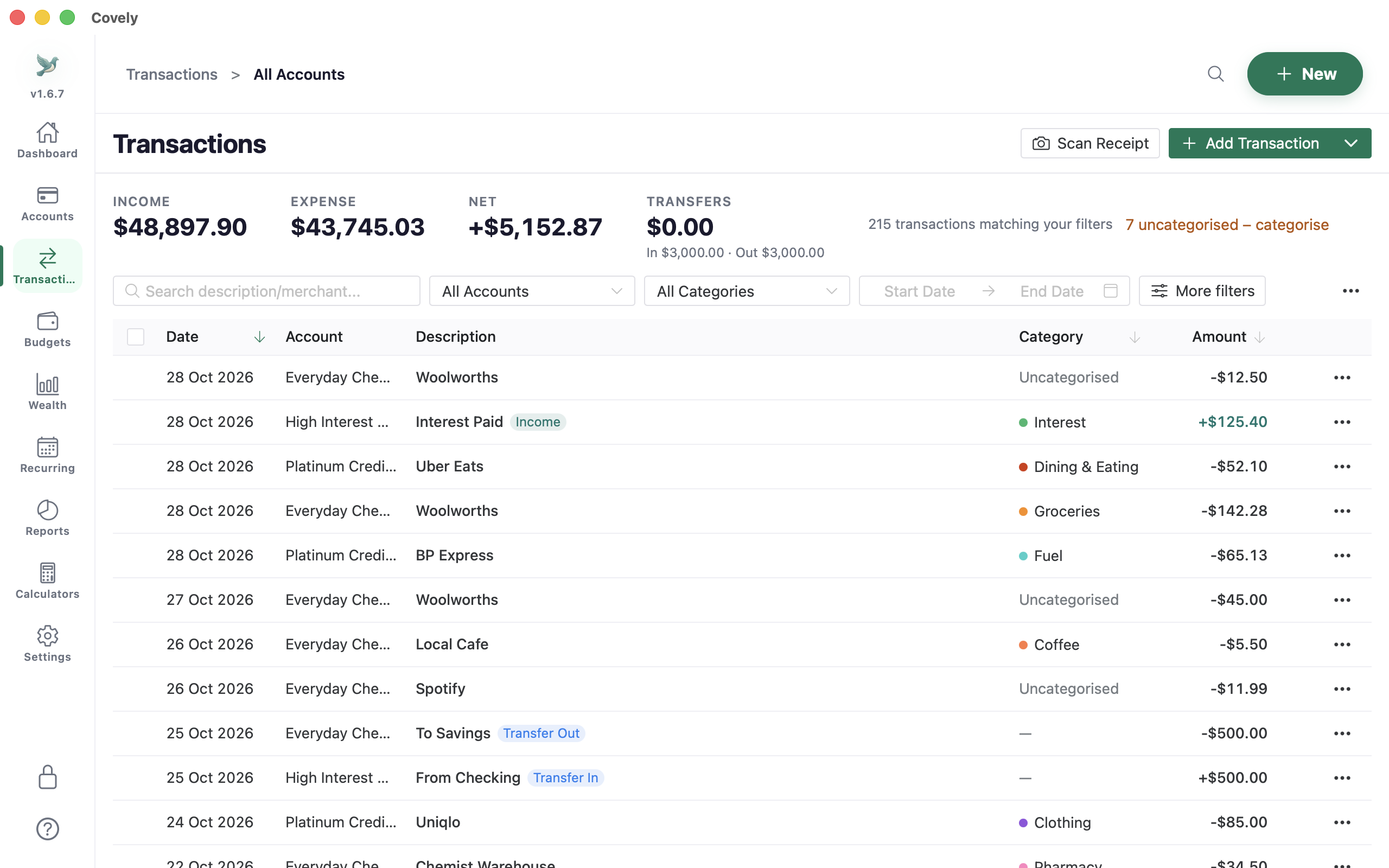
Covely is a desktop app with a modern interface that runs the same on Linux, Mac and Windows, so you can move between them. It covers budgets, savings goals, bank file import (CSV, OFX, QIF) with automation rules, reconciliation, investments, property and more than 20 reports. On Linux it's available as a Flatpak and a .deb package.
- Drawbacks: not open source (the source is available under its own licence); receipt scanning isn't available on Linux yet; no bank sync.
- Price: free with no time limit; PRO is a one-time $9.90.
- Best for: people who want an all-in-one app that looks and works the same on every computer they use.
7. Plain-text accounting: hledger, Ledger and Beancount
If you live in a terminal, plain-text accounting tools keep your finances in a text file you can edit in any editor and track with Git. hledger and Ledger read a simple journal format; Beancount adds stricter checking and a web interface called Fava. They're powerful and fully under your control, but you'll write import scripts and learn the syntax.
- Best for: developers and anyone who wants their books in version control.
How to choose
- Accountant-grade books: GnuCash or KMyMoney.
- Envelope budgeting: Actual Budget.
- Quick, simple tracking: HomeBank.
- Everything in one app that also runs on Mac and Windows: Covely.
- Text files and Git: hledger or Beancount.
Frequently asked questions
What is the best personal finance software for Linux?
For bookkeeping, GnuCash or KMyMoney. For budgeting, Actual Budget. For a modern all-in-one app with investments and reports, Covely. For a terminal workflow, hledger or Beancount.
Is there a Quicken alternative for Linux?
Quicken doesn't run on Linux. GnuCash, KMyMoney, Skrooge and Covely can all import QIF files exported from Quicken, so you can bring your history with you.
Which Linux finance apps are on Flathub?
GnuCash, KMyMoney, Skrooge and Actual Budget are on Flathub. Covely provides its own Flatpak package and a .deb.
Try Covely on your own numbers
Free for Mac, Windows and Linux, with no account and no time limit.
Get Covely Free