The Best Personal Finance Software for Mac in 2026
Seven Mac apps for budgeting, tracking investments and replacing Quicken, compared on price, bank sync, investments and where your data lives.
Quicken was the default personal finance software on the Mac for decades. Today it's subscription-only, and many Mac users are looking for something cheaper, more private or simply more Mac-like. This guide compares the main options on macOS in 2026.
I build Covely, one of the apps below, so it's listed first. Each entry says who the app suits and where it falls short. Prices were checked in October 2026 and are in US dollars unless noted.
Quick comparison
| App | Price | Bank sync | Investments | Data stored |
|---|---|---|---|---|
| Covely | Free; PRO $9.90 one-time | No (file import) | Yes, plus property | On your Mac |
| Quicken Classic for Mac | Subscription only | Yes | Yes (Premier plan) | On your Mac, with cloud sync |
| Banktivity | From $6.99/month, billed yearly | Yes | Yes | Apple devices, with sync |
| Moneydance | About $65 one-time | Optional add-on (North America) | Yes | On your Mac |
| Copilot Money | About $95/year | Yes | Yes | Cloud |
| GnuCash | Free, open source | Limited | Yes | On your Mac |
| Actual Budget | Free, open source | Optional, via your own server | No | On your Mac |
1. Covely: best free Quicken alternative for Mac
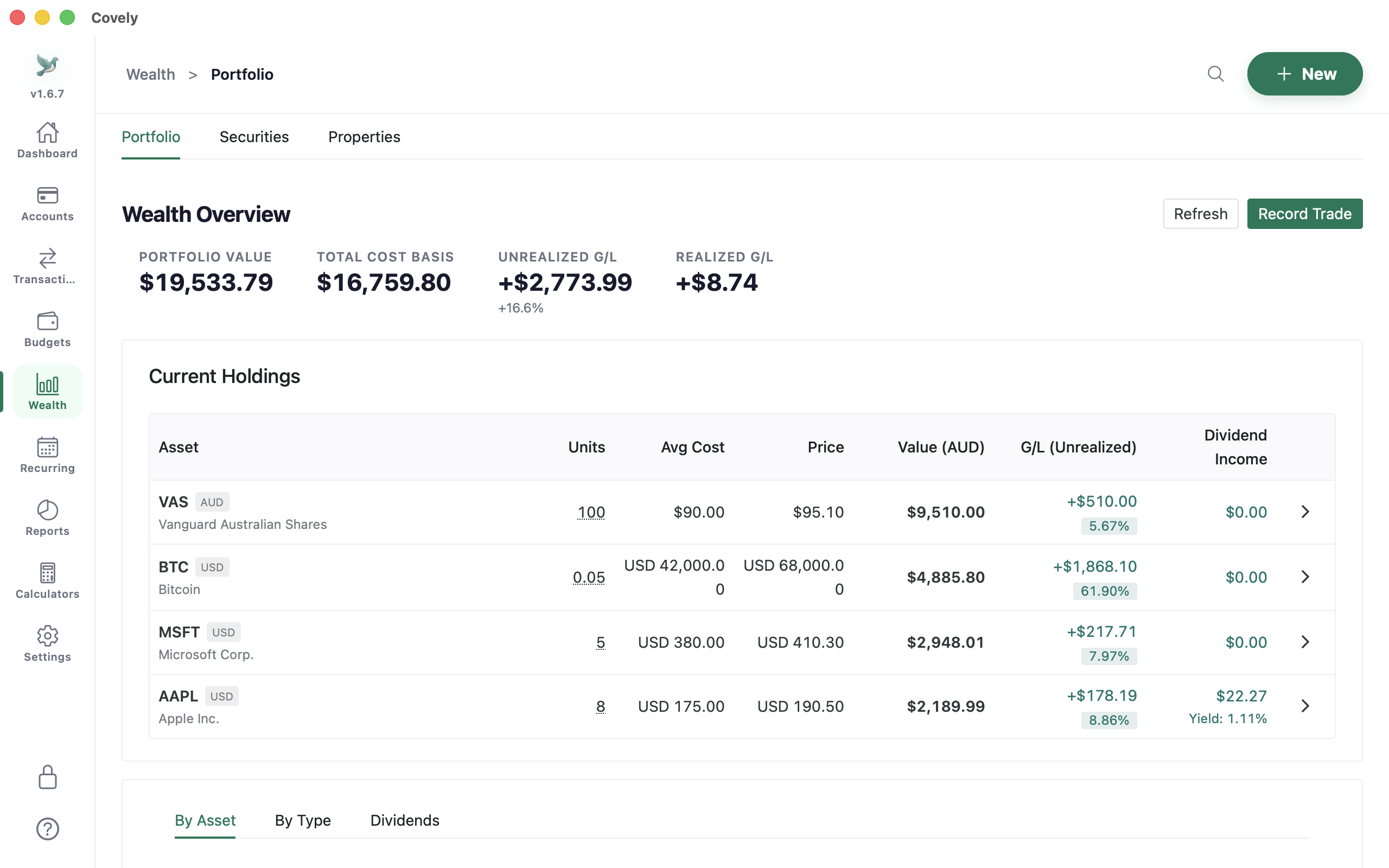
Covely is a native desktop app for Apple Silicon and Intel Macs, also on the Mac App Store. It covers budgets, transactions, investments and property, and keeps everything in a database on your Mac. There's no account to create and no bank login: you import CSV, OFX or QIF files, including QIF exports from Quicken.
- Strengths: free with no time limit; budgets, savings goals and recurring bills; shares, ETFs, crypto and property in multiple currencies; multiple portfolios; more than 20 reports, including a custom report builder and capital gains estimate; receipt scanning using macOS's own text recognition.
- Drawbacks: no automatic bank feeds; no iPhone app; a newer, smaller project than Quicken.
- Best for: Mac users who want Quicken's breadth without a subscription or a cloud account.
2. Quicken Classic for Mac
Quicken Classic is still the most complete traditional finance app on the Mac, with bank downloads, bill tracking and investments. There's no longer a one-time purchase: it's sold as a yearly subscription in Deluxe, Premier and Business & Personal tiers, often discounted for new customers. The Mac version has historically lagged the Windows version for some features, so check that anything you rely on is included.
- Best for: people who want automatic bank feeds and don't mind the subscription.
3. Banktivity
Banktivity is a native app for Mac, iPhone and iPad with bank connections, envelope-style budgets and investments. Plans start at $6.99 a month, billed yearly, and one subscription covers all your Apple devices.
- Strengths: very Mac-like; bank connections; syncs with iPhone and iPad.
- Drawbacks: subscription-only; Apple devices only.
4. Moneydance
Moneydance has been a Quicken alternative on the Mac for years. A one-time licence costs about $65 and includes the next major upgrade. Downloading transactions from banks is an optional Moneydance+ subscription for North American banks.
- Strengths: one-time purchase; a familiar register; good investment tracking.
- Drawbacks: the interface feels dated; bank sync costs extra.
5. Copilot Money
Copilot is a polished, design-led budgeting app for Mac and iPhone that connects to your bank accounts automatically. It's a subscription of about $95 a year, or $13 a month, and your data is stored in its cloud service.
- Best for: US users who want automatic tracking and a beautiful iPhone app, and are comfortable with a cloud service.
6. GnuCash
GnuCash is free, open source and has official installers for Apple Silicon and Intel Macs. It uses proper double-entry accounting, which makes it very accurate but harder to learn.
- Best for: people comfortable with bookkeeping who want a free, long-lived tool.
7. Actual Budget
Actual is a free, open-source envelope budgeting app with a desktop app for Mac. Your budget lives on your device; syncing between devices and bank sync need an Actual server that you host or rent.
- Best for: YNAB-style budgeting without a subscription. It doesn't track investments.
Moving from Quicken for Mac
- In Quicken, export each account as a QIF file, or download a year or two of OFX or CSV files directly from your bank.
- Create the matching accounts in your new app and import the files.
- Check that each account's balance matches Quicken on the same date before you stop using it.
- For investments, it's usually simplest to enter your current holdings as opening trades rather than importing years of history.
For more on the switch, see the best Microsoft Money alternative and our comparison of the best offline personal finance software.
Frequently asked questions
What is the best free personal finance software for Mac?
For budgets, investments and property in one app, Covely's free version, which has no time limit. For double-entry bookkeeping, GnuCash. For envelope budgeting, Actual Budget.
Is there a Quicken for Mac alternative without a subscription?
Yes. Covely (free, with an optional one-time PRO licence), Moneydance (one-time purchase) and GnuCash (free) all run on macOS without a subscription.
Can I import my Quicken data on a Mac?
Most alternatives import QIF, OFX or CSV files. Export your accounts from Quicken as QIF, or download OFX or CSV files from your bank, then import them and check the balances match.
Which Mac finance apps keep my data on my computer?
Covely, Moneydance, GnuCash and Actual Budget store your data locally. Quicken stores it locally but adds cloud sync; Banktivity and Copilot rely on online services for bank and device sync.
Try Covely on your own numbers
Free for Mac, Windows and Linux, with no account and no time limit.
Get Covely Free